
Switch on Score Centre notifications for transfer updates
Monday 1 February 2016 07:50, UK

Transfer Deadline Day is upon us and you can keep up to date with all the latest news and done deals with push notifications on the Sky Sports Score Centre app.
Whether you have an iPhone, Android or Windows 10 phone, are at home or are on the go, turn on push notifications to get news on YOUR club's deals before anybody else.
Here at Sky Sports we strive to keep you informed, so we've devised this easy step-by-step guide to ensure you don't miss a trick come Deadline Day.
How to make sure you are up to date…
1) Ensure you have latest version of the Score Centre app - 4.2.0 on iOS devices and 4.4.0 on Android
2) Open the Score Centre app (enter your Sky login details if prompted)
3) If prompted, re-select your favourite team(s)
4) Hit the drop-down menu at the top of the app and select "Notifications"
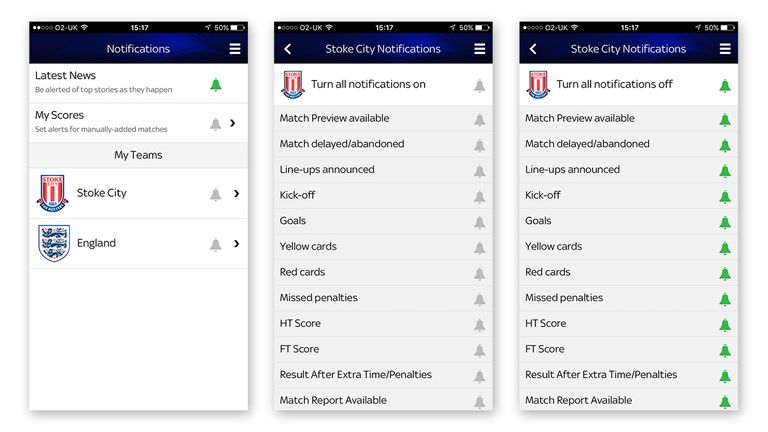
5) Tap on your favourite team in the "My Teams" section and pick which notifications you would like to receive (green = selected, grey = unselected)
6) Away from your club, you can also choose to receive alerts on the latest top stories and manually-added matches as they happen. Simply select the "Latest News" and "My Scores" panels at the top of the notifications page.